
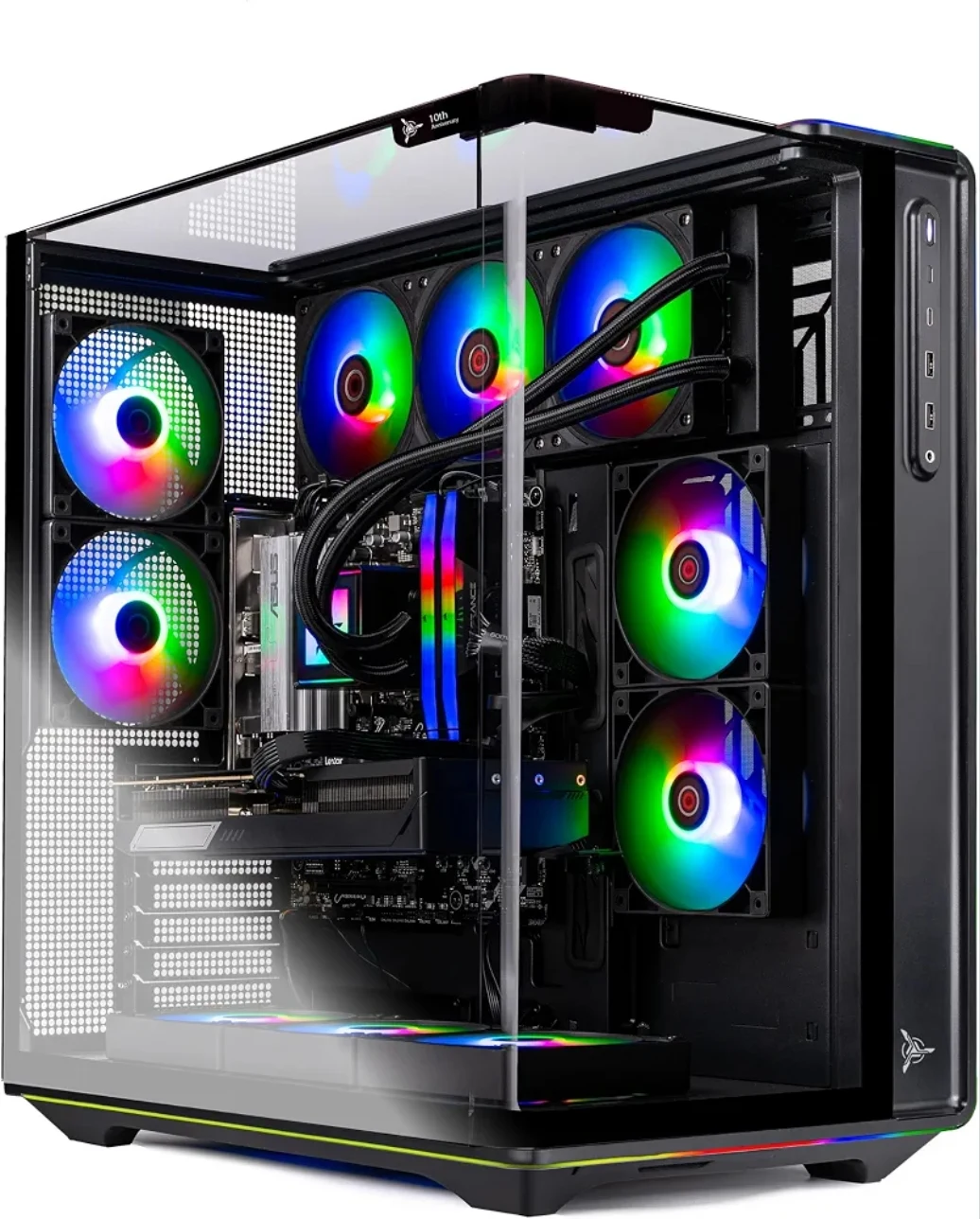
A powerful CPU/GPU combination, 32GB DDR5 memory and 2TB of storage make this a gaming PC worth comparing—with storage expansion to plan around the actual motherboard.
Updated: October 23, 2026
Affiliate disclosure: As an Amazon Associate I earn from qualifying purchases. Buying through our affiliate links may earn Bobs PC Hardware a commission at no additional cost to you.
By Bobs PC Hardware · Editorial approach and affiliate disclosure. This guide explains buying decisions and cites sources where provided; it is not a firsthand benchmark review.
Is the Skytech Prism 5 Worth Considering?
The main attraction of this Skytech Prism 5 configuration is its combination of an AMD Ryzen 7 9850X3D processor and AMD Radeon RX 9070 XT graphics card. Those are the parts that do most of the work in delivering a responsive, high-performance gaming experience—not decorative lighting or a claimed discount.
The graphics-card affiliate link opens a standalone ASUS PRIME RX 9070 XT 16GB OC, not the complete PC. It does not confirm the GPU brand or board model installed in this Skytech configuration.
The linked listing identifies 32GB of DDR5-6000 memory, a 2TB PCIe Gen 4 NVMe SSD, an 850W Gold ATX 3 power supply, a 360mm ARGB liquid cooler, Wi-Fi 5 and Windows 11. That is a substantial starting configuration for a gaming-focused desktop.
For buyers targeting high-refresh-rate 1440p gaming, or 4K gaming with settings chosen to suit each game, the CPU/GPU pairing is the reason to look closely. More storage can be added or substituted later if the motherboard and case provide the right connections and clearance.
Our recommendation: Compare this exact configuration against other PCs with similar processors and graphics cards. Prioritize the strength of the CPU/GPU pairing and the practical ability to expand storage, rather than assuming that the biggest advertised discount means the best value.
Check Price at Amazon (affiliate link)
No live price, discount or stock status is shown here. Confirm the selected configuration, seller, current price and warranty before ordering. This is a listing-based buying guide, not a hands-on review or benchmark test of this assembled PC.
Skytech Prism 5 Configuration at a Glance
| Component | Configuration identified by the linked listing |
|---|---|
| Processor | AMD Ryzen 7 9850X3D |
| Graphics card | AMD Radeon RX 9070 XT |
| Graphics memory | 16GB GDDR6, per AMD's RX 9070 XT specifications |
| System memory | 32GB DDR5-6000; confirm the installed kit and operating settings |
| Included storage | 2TB PCIe Gen 4 NVMe SSD |
| CPU cooling | 360mm ARGB all-in-one liquid cooler |
| Power supply | 850W Gold ATX 3; confirm the exact manufacturer and model |
| Wireless networking | Wi-Fi 5 |
| Operating system | Windows 11; confirm the edition on the selected configuration |
| Motherboard | Exact model and available expansion slots not independently confirmed |
| Additional storage | Depends on available M.2 slots, SATA connections, drive mounts and clearance |
Listings and selectable configurations can change. These details describe the listing associated with ASIN B0HJPV6NH8, not every PC sold under the Prism name. Exact GPU, SSD, motherboard and power-supply brands should be checked with the seller.
1. The Ryzen 7 9850X3D Is a Strong Gaming Foundation
AMD's official specifications identify the Ryzen 7 9850X3D as an eight-core, 16-thread Zen 5 processor with a boost clock of up to 5.6GHz, 96MB of L3 cache and an AM5 socket.
Its AMD 3D V-Cache design is especially relevant to gaming. Keeping more frequently used data close to the processor can reduce trips to slower system memory in workloads that benefit from the extra cache.
That does not translate into the same improvement in every game. CPU-sensitive competitive games, simulations and other demanding titles can place different demands on the processor. Resolution, graphics settings, memory configuration and the graphics card also affect the result.
The appeal here is that the PC starts with a high-end gaming processor. Buyers can concentrate on finding the right display and graphics settings rather than planning an immediate CPU replacement.
For the differences between AMD's gaming processors, read our Ryzen 7 7800X3D vs 9800X3D vs 9850X3D comparison.
2. The Radeon RX 9070 XT Completes the CPU/GPU Pairing
The Radeon RX 9070 XT is the other major reason to consider this configuration. AMD specifies 16GB of GDDR6 graphics memory and RDNA 4 architecture for this GPU.
The combination matters more than either component alone. A fast gaming processor helps in CPU-limited situations, while the graphics card handles the heavy rendering work as resolution and visual quality increase.
What to Expect at 1080p, 1440p and 4K
1080p: This is a substantial configuration for competitive gaming and high-refresh-rate displays. Some games will still be limited by their engine or CPU workload, so a fast display does not guarantee that every title will reach its maximum refresh rate.
1440p: This is a particularly sensible target for the pairing. It offers room to pursue detailed visuals and high refresh rates, with the actual balance depending on the game and chosen settings.
4K: The RX 9070 XT is a capable option, but demanding games, heavy ray tracing and high refresh-rate targets can require lower settings or supported upscaling. Do not assume that every modern game will run at maximum settings at a fixed frame rate.
We have not measured FPS on this Skytech system. Independent component benchmarks are useful context, but cooling, firmware, drivers and the exact installed hardware can affect an assembled PC.
Why 16GB of Graphics Memory Helps
Higher-resolution textures and demanding games can use substantial graphics memory. A 16GB framebuffer provides useful capacity, but memory size alone does not determine performance or guarantee future compatibility.
The practical selling point remains the whole combination: a strong X3D gaming CPU paired with a capable modern GPU. See our graphics card buying guide for help comparing the trade-offs.
3. 32GB DDR5 and a 2TB SSD Are a Useful Starting Point
The listing's 32GB of DDR5 memory is a sensible amount for many gaming PCs running a game alongside browsers, chat software and launchers. Some heavily modified games and professional projects can need more, but 64GB is not an automatic first upgrade.
DDR5-6000 is the listed memory specification, not a guarantee that every system will arrive running that setting. Confirm the kit, memory layout, firmware settings and stability before changing memory profiles.
A 2TB NVMe SSD also gives buyers a useful starting capacity. Available space after formatting and software installation will be lower than the advertised capacity, and large game libraries can still fill it quickly.
Our RAM capacity guide and SSD buying guide can help you decide where additional spending is worthwhile.
4. Storage Expansion Is the Practical Upgrade to Plan
The included 2TB Gen 4 NVMe SSD should not be treated as a weakness just because faster interfaces exist. A good Gen 4 drive is already useful for Windows, games and everyday applications.
For many owners, the next improvement will be more capacity, rather than replacing the processor or graphics card. Keeping additional games installed, working with video files and separating project storage from the operating system can all make an extra drive worthwhile.
Check the Motherboard Before Buying Another SSD
We have not confirmed the exact motherboard model or the number of unused M.2 slots in this Skytech configuration. The earlier ABS system's motherboard specifications do not apply to this PC.
Before buying a drive:
- Ask Skytech or the seller for the exact motherboard model and revision.
- Check its manual for M.2 slot count, supported drive lengths, interface speeds and lane-sharing restrictions.
- Confirm which slot holds the included SSD and whether another compatible slot is free.
- Check SSD heatsink clearance around the graphics card and other components.
- If considering SATA storage, confirm available data ports, power connectors and mounting points.
- Check the system warranty and upgrade instructions before opening the case.
If there is no usable spare slot, replacing the existing SSD with a larger compatible drive may be an option. Back up your files first and plan for cloning or reinstalling Windows.
2TB or 4TB: Capacity Before Interface Generation
| Upgrade option | When it makes sense |
|---|---|
| Keep the included 2TB Gen 4 SSD | Your current games and files fit comfortably |
| Add a compatible 2TB SSD | You want more game storage without a large capacity jump |
| Add a compatible 4TB SSD | You maintain a large game library or work with large media files |
| Replace the included SSD | No suitable spare slot is available and you need more capacity |
| Consider a Gen 5 SSD | The exact motherboard, available slot, cooling and workload justify it |
Gen 5 support is not confirmed for this PC. The processor's PCIe capability does not prove that a particular motherboard exposes an available Gen 5 M.2 slot.
A faster SSD can improve some transfers and storage-heavy workloads, but it does not automatically raise gaming FPS. Loading-time benefits vary by game and drive. Capacity and compatibility should come before buying the highest advertised sequential speed.
5. Cooling, Power and Support Still Matter
The listed 360mm liquid cooler and 850W Gold ATX 3 power supply are useful specifications to investigate, not proof of quiet operation, low temperatures or a particular build quality.
Ask about the exact cooler and PSU models, case airflow, graphics card connectors, warranty length and support process. An efficiency label does not establish every aspect of power-supply quality.
A prebuilt saves the work of assembling individual components, but it still needs sensible setup, driver updates and checks for shipping damage. Return terms and the seller's service arrangements are part of the purchase decision.
6. What We Like and What to Verify
Pros
- Ryzen 7 9850X3D and RX 9070 XT form a strong gaming-focused pairing.
- 16GB of graphics memory provides useful capacity for demanding games.
- 32GB DDR5 and a 2TB NVMe SSD reduce the need for immediate memory or storage changes.
- A sensible configuration to compare for 1440p gaming and settings-adjusted 4K gaming.
- Storage capacity can potentially be expanded without replacing the CPU or GPU, subject to the actual board and case.
Limitations
- Exact motherboard, spare storage slots and Gen 5 SSD support remain unconfirmed.
- No hands-on measurements of this PC's frame rates, temperatures or noise are provided.
- Heavy ray tracing and demanding 4K games may require settings compromises.
- Exact component models, seller terms and current pricing need checking.
- Buyers with specialized creative applications should check those applications' CPU and GPU requirements.
Who Should Consider This Skytech Prism 5?
1440p gamers: Buyers looking for a strong CPU/GPU foundation for a high-refresh-rate display.
4K gamers comfortable tuning settings: Players who understand that demanding titles may need optimized settings or supported upscaling.
Buyers who prefer a complete system: People who value avoiding a full component-by-component assembly, while still checking the quality and support behind the finished PC.
Owners with growing game libraries: Buyers who want a useful 2TB starting drive and are willing to verify the available expansion options before purchasing more storage.
This is not automatically the best-value PC at every price. Compare similarly equipped systems and the complete cost of building your own, including Windows, cooling, assembly time and support.
Final Verdict: Buy for the CPU/GPU Combination, Expand Storage When Needed
The Skytech Prism 5 configuration linked here deserves consideration because of its Ryzen 7 9850X3D and Radeon RX 9070 XT combination. Its 32GB DDR5 memory and 2TB Gen 4 NVMe SSD form a useful starting platform around those core parts.
Storage expansion is the practical longer-term opportunity. If your game library outgrows the included drive, investigate a compatible 2TB or 4TB addition—or a larger replacement—after confirming the exact motherboard and free connections.
There is no need to make an unverified Gen 5 claim to explain the appeal. The recommendation is straightforward: compare the current price and support against similar PCs, buy for the CPU/GPU pairing, and add storage only when capacity or your workload calls for it.
Check Price and Availability at Amazon (affiliate link)
As an Amazon Associate I earn from qualifying purchases. Check the exact selected configuration and checkout total; no current price or discount is represented in this article.
Frequently Asked Questions
Is this the ABS Stratos II Ruby?
No. The linked product is the Skytech Prism 5 configuration with a Ryzen 7 9850X3D and Radeon RX 9070 XT. Specifications from an ABS desktop should not be applied to it.
Is this pairing suitable for 1440p and 4K gaming?
It is a strong configuration to consider for 1440p gaming and capable 4K gaming. Performance depends on the game, settings and complete system. Demanding 4K or ray-traced games may require compromises.
Does this PC support a Gen 5 SSD?
That has not been confirmed. Obtain the exact motherboard model and check the manual, slot availability, lane sharing and cooling clearance before buying a Gen 5 drive.
Will adding an SSD improve gaming FPS?
Usually the main benefit is additional capacity or faster storage operations, not higher gaming frame rates. Loading-time improvements depend on the game and drives involved.
Should I upgrade the CPU or GPU immediately?
For many gaming buyers, this pairing is already the reason to consider the PC. Test it against your own games and display before planning replacements. Additional storage may be more useful if capacity becomes the limiting factor.
Sources and Further Reading
- Linked Skytech Prism 5 configuration on Amazon (affiliate link)
- AMD Ryzen 7 9850X3D official specifications
- AMD Radeon RX 9070 XT official specifications
- What to check before buying a fully built PC
- PC parts compatibility checklist
Editorial note: Bobs PC Hardware has not independently tested this assembled system. Hardware guidance uses the identified listing and official component specifications. No invented prices, discounts, availability, ratings or benchmark results are included.