
Bobs PC Hardware | Updated October 11, 2026
Nvidia's GeForce RTX 5090 is one of the most powerful gaming graphics cards ever released, but reports of melting power connectors continue to raise serious concerns. Now, an independent hardware modder has demonstrated a possible solution that significantly reduces the electrical load on the GPU's original power connector.
With an RTX 5090 carrying a substantial price tag, owners shouldn't have to worry about a power cable overheating during an intensive gaming session or rendering workload.
Yet that's exactly what some users have experienced.
In May 2025, Tom's Hardware documented an RTX 5090 with a severely burned yellow-tipped power adapter. More recently, on October 4, 2026, the publication reported that a hardware enthusiast had developed a custom power-distribution modification capable of operating through a 48-hour, 550-watt stress test without the measured wires or joints exceeding 40°C (104°F).
These are separate incidents, but together they highlight both the weaknesses of high-current GPU power connections and an interesting direction for improving their reliability.
By Bobs PC Hardware · Editorial approach and affiliate disclosure. This guide explains buying decisions and cites sources where provided; it is not a firsthand benchmark review.
RTX 5090 Meltdown: What Happened to the Yellow Power Connector?
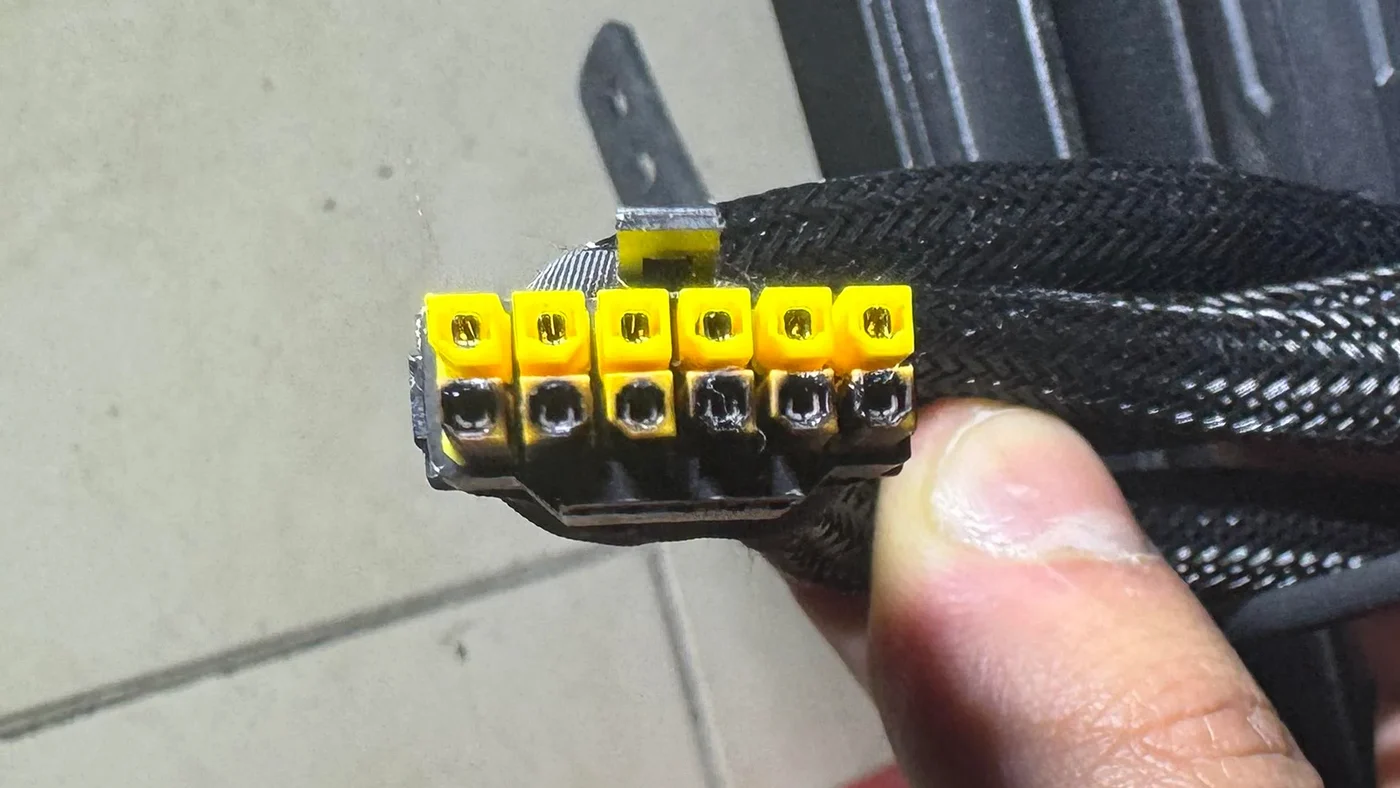
In its May 26, 2025 report, Tom's Hardware documented an RTX 5090 power connector failure involving an MSI Gaming Trio RTX 5090.
The system reportedly featured:
- Graphics card: MSI GeForce RTX 5090 Gaming Trio
- Power supply: Corsair HX1500i, ATX 3.1 compliant
- Power connection: MSI yellow-tipped four 8-pin to 16-pin adapter
- Usage: Approximately two months before the reported failure
The yellow connector was designed to help users verify that the cable was completely inserted. When connected correctly, the yellow section should no longer be visible.
Despite that safety-oriented design, the adapter sustained extensive damage along its 12-volt contact row.
Interestingly, the GPU's own connector reportedly showed no obvious damage and was said to function with a replacement cable.
However, the owner had not explicitly confirmed whether the original adapter was fully seated, so the exact cause of this particular failure could not be established.
The incident raises an important question: Why can a power connector rated for hundreds of watts overheat on a graphics card using an otherwise capable power supply?
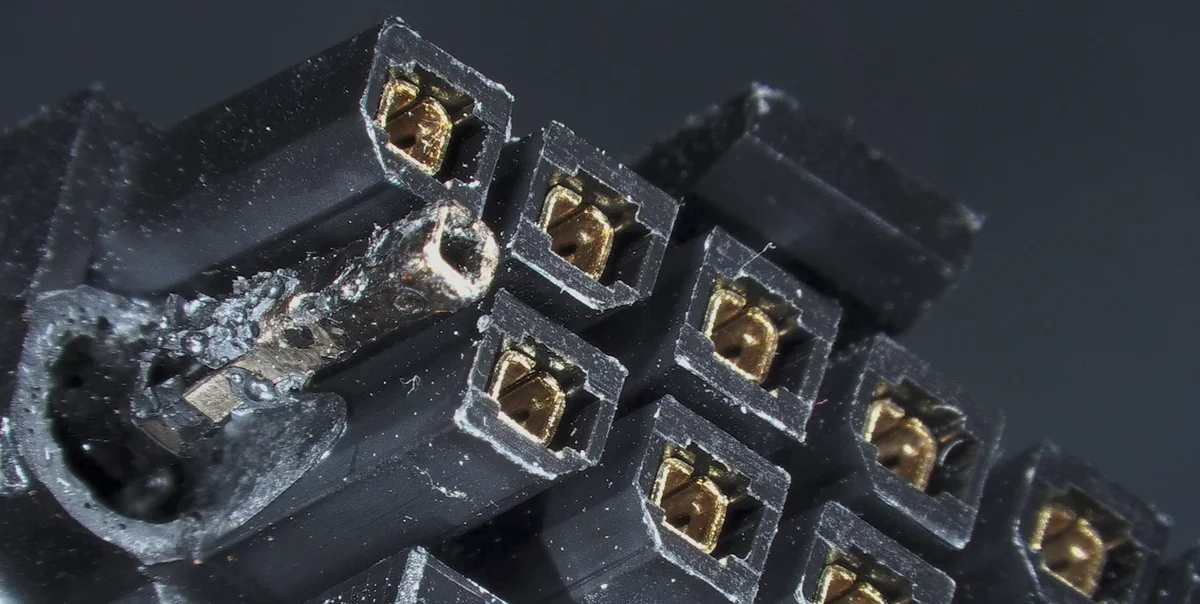
Heat damage can deform a connector housing and expose its terminals. This reader-supplied close-up illustrates connector damage; the photograph alone does not establish the GPU model or the cause of failure.
Why Are Nvidia RTX 5090 Power Connectors Melting?
The underlying concern involves how large electrical currents travel through relatively small connector contacts.
Nvidia rates the standard RTX 5090 at 575 watts of total graphics power. Its recommended supplementary power connection is either a compatible 600-watt PCIe Gen 5 cable or the supplied four 8-pin adapter.
The modern 16-pin connector, commonly described using the 12VHPWR or revised 12V-2x6 standards, contains:
- Six positive 12-volt power contacts
- Six ground contacts
- Four smaller signaling contacts
Under proper operating conditions, the power-carrying contacts share the electrical load.
Problems can occur when that current is distributed unevenly.
1. Uneven Current Distribution
Ideally, current flows through multiple power contacts rather than becoming concentrated in only a few.
However, imperfect connections, differences in contact resistance, or damaged terminals can cause some contacts to carry more electricity than others.
When one contact carries excessive current, heat can accumulate quickly.
This is particularly concerning with the RTX 5090 because its enormous power requirements place substantial demands on the entire connector assembly.
2. Electrical Resistance Creates Heat
The electrical principle behind connector overheating is relatively straightforward.
Heat generated by electrical resistance increases with the square of the current.
In electrical engineering, this relationship is expressed as:
P = I²R
Where:
- P represents power dissipated as heat.
- I represents electrical current.
- R represents resistance.
If a connector develops higher resistance while carrying substantial current, localized heating can increase dramatically.
That heat can soften or deform the plastic connector housing, potentially reducing contact quality even further.
This creates a dangerous feedback cycle in which increasing resistance generates additional heat.
Eventually, the connector may discolor, melt, or suffer severe damage.
3. Limited Individual Contact Monitoring
Another concern involves how some Nvidia graphics cards monitor incoming electricity.
Certain earlier high-end implementations used more detailed electrical monitoring to help detect abnormal power delivery conditions.
Monitoring capabilities vary by board design. A reported total power reading does not, by itself, show how current is distributed across individual connector contacts.
Consequently, a card may continue operating even if one contact is carrying a disproportionate share of the electrical load.
A localized hotspot might develop without the GPU recognizing the specific problem.
Some premium cards incorporate additional current-monitoring capabilities, but these features aren't universal.
4. The Connector Has Little Room for Error
The revised 12V-2x6 design was intended to improve connection reliability compared with earlier 12VHPWR implementations.
Nevertheless, higher electrical loads make poor contact quality more consequential.
Possible contributing factors include incomplete insertion, damaged contacts, excessive cable strain, manufacturing variations, and uneven current distribution.
Importantly, not every RTX 5090 is experiencing connector failures, and the available reports do not establish an overall failure rate.
The problem is real, but individual incidents require investigation rather than assuming that every failure has the same cause.
One Modder's Solution: Add Two More 8-Pin Power Connections
On October 4, 2026, Tom's Hardware reported on a custom RTX 5090 power modification developed by Reddit user u/DallasGrave, who is associated with custom PC cooling business GRAVEPC.
Rather than relying entirely on the existing 16-pin power connection, the modder developed a custom power distributor to spread the GPU's electrical demand across additional wiring.
The approach is based on a straightforward principle:
Reduce the amount of electricity traveling through each conductor by providing additional paths for the current.
How the Custom RTX 5090 Power Modification Works
According to the modder's explanation, the modification includes a custom pickup PCB attached to contacts associated with the graphics card's original power header.
That PCB routes electricity to an auxiliary distribution board equipped with two additional PCIe 8-pin connectors.
Importantly, the modification does not eliminate the original 16-pin connector.
Instead, it creates three parallel power connection paths:
- The original 16-pin GPU connection.
- An additional PCIe 8-pin connection.
- A second additional PCIe 8-pin connection.
The custom distributor makes it possible to share the load across a larger number of conductors.
The idea is that reducing current through the original 16-pin connection can lower the heat generated by its contacts.
The modder reported approximately 3 amps per conductor in his tested configuration.
This is a substantial reduction compared with the current that individual contacts might carry when nearly all the GPU's electrical demand passes through the original connector alone.
The modification is not simply a plug-in adapter. It involves soldering electrical connections directly to the GPU's circuit board, making it invasive and unsuitable for ordinary home installation.
The Results: 550 Watts for 48 Hours Without Exceeding 40°C
The most impressive part of the project is the modder's reported stress-testing result.
According to the original account, the modified graphics card operated under a sustained 550-watt load for 48 hours.
Here are the reported figures:
| Test parameter | Reported result |
|---|---|
| GPU electrical load | 550 watts |
| Test duration | 48 hours |
| Maximum measured wire/joint temperature | Below 40°C (104°F) |
| Additional power inputs | Two PCIe 8-pin connections |
| Original 16-pin connector | Retained |
| Reported current per conductor | Approximately 3 amps |
The reported temperature refers to the wiring and electrical joints being tested, not the GPU core temperature.
Keeping those connections below 40°C under a sustained high-power workload is encouraging.
It suggests that distributing electrical current across additional power connections can reduce localized heating.
However, these figures come from the modder's own testing. Publicly available independent validation, long-term reliability studies, and comprehensive fault testing would be needed before calling this a definitive solution.
You can see the original project discussion in the modder's Reddit post.
Could This Become a Commercial RTX 5090 Fix?
The modder has indicated that a similar modification could eventually be offered with specially prepared PNY graphics cards.
In the Reddit discussion, he described plans for a PNY-specific product with warranty coverage handled through his business.
That is potentially interesting for enthusiasts, particularly those running expensive GPUs under sustained workloads.
However, an intention to provide warranty coverage is not the same as an independently verified commercial warranty program.
Buyers would need to confirm product availability, exact coverage terms, electrical safety testing, PSU compatibility, and installation requirements before considering such a product.
For now, the modification is best viewed as a promising engineering experiment rather than an approved universal upgrade.
Is the 16-Pin Power Connector Fundamentally Flawed?
The 16-pin format offers genuine advantages.
It provides a compact connection capable of handling considerable power without requiring several bulky connectors along the graphics card.
That simplifies cable management and allows manufacturers additional flexibility when designing very large GPUs.
However, convenience comes with trade-offs.
A high-power connector has to maintain excellent electrical contact across its terminals while operating under substantial load.
Older multi-connector PCIe designs often distributed electrical demand across several physically separate plugs.
The RTX 5090's power requirements make the reliability of a single high-current connection particularly important.
The modder's design demonstrates an alternative: retain the existing connection while introducing additional electrical paths to share its workload.
But that doesn't automatically prove every 16-pin connector is defective or every multi-8-pin configuration is safe. Wiring quality, contact resistance, protection circuitry, and proper implementation remain essential regardless of connector type.
How to Reduce the Risk of an RTX 5090 Power Connector Meltdown
Most graphics card owners should never attempt to solder additional power connections onto their GPU.
There are, however, sensible precautions that can help reduce preventable connector problems.
1. Use the Correct Power Supply and Cables
Nvidia recommends a 1,000-watt system power supply for its reference RTX 5090 configuration, although actual requirements depend on the complete system and the specific graphics card model.
Use a reputable PSU that meets your system's power requirements.
Choose the native PCIe Gen 5 cable or manufacturer-approved adapter specified for your card and PSU.
Never assume modular PSU cables are interchangeable between different power supply brands or models.
2. Make Sure the Connector Is Fully Seated
A partially inserted 16-pin connection can increase the likelihood of poor electrical contact.
With the computer switched off and disconnected from power, follow the manufacturer's instructions to verify complete insertion.
For connectors with colored seating indicators, make sure the visual indicator confirms proper installation.
Remember that correct insertion reduces risk but does not guarantee protection against every possible failure.
3. Avoid Excessive Cable Bending
Large graphics cards can create clearance problems inside PC cases.
A side panel pressing against the power cable may place unwanted mechanical stress near the connector.
Follow the connector and cable manufacturer's recommended bending clearances.
If your case lacks enough space, consider changing the cable routing or case rather than forcing the cable into position.
4. Watch for Signs of Overheating
Warning signs include:
- Discoloration near the connector
- Deformed or damaged connector plastic
- An unusual burning smell
- Smoke or signs of scorching
- Unexpected electrical or power-delivery problems
If you suspect connector damage, shut down the system and disconnect power when safe to do so.
Do not continue testing a visibly damaged or charred connection. Contact the GPU or PSU manufacturer for evaluation and warranty assistance.
5. Consider Cards With Additional Power Monitoring
Some premium graphics cards offer more detailed power-connector monitoring.
For example, certain ASUS ROG Astral RTX 5090 models include current-imbalance detection that can warn users about abnormal power distribution.
Such features may offer additional warning capabilities, although no monitoring system can guarantee prevention of every connector failure.
6. Don't Assume a Lower Power Limit Solves the Problem
Reducing a GPU's power limit can reduce its overall electrical demand, but it cannot repair damaged terminals, defective contacts, or improper wiring.
A lower power limit should never be treated as permission to continue using a compromised connector.
Frequently Asked Questions About RTX 5090 Melting Connectors
Why does the RTX 5090 power connector melt?
Connector overheating can result from excessive electrical resistance, uneven current distribution, poor contact quality, cable strain, or damaged terminals. High electrical demand increases the consequences of these problems.
Does the RTX 5090 use 12VHPWR or 12V-2x6?
The RTX 5090 generation uses the revised 12V-2x6 connection standard, which is related to the earlier 12VHPWR design. Both are commonly described as 16-pin GPU power connectors.
Can a better power supply prevent RTX 5090 connector melting?
A properly rated, high-quality PSU with compatible cabling is important, but it cannot eliminate every risk associated with contact resistance or uneven current distribution at the graphics card connector.
Did the modder permanently solve the RTX 5090 melting problem?
Not conclusively. The custom power distributor produced encouraging self-reported results during a 48-hour, 550-watt test. However, longer-term independent testing is needed to verify reliability and safety across different cards and configurations.
Should RTX 5090 owners install this modification themselves?
No. The modification involves soldering directly to the graphics card's electrical circuitry. Mistakes could destroy the card, create electrical hazards, or affect warranty coverage. It is not a recommended consumer DIY repair.
Bobs PC Hardware Verdict: A Clever Solution to a Serious Power-Delivery Concern
The RTX 5090 connector controversy highlights a problem that modern PC hardware manufacturers must continue addressing.
As graphics cards become more powerful, their electrical connections must remain reliable under demanding real-world conditions.
The documented MSI connector failure shows how severe damage can become when a high-current connection overheats.
Meanwhile, the custom solution developed by u/DallasGrave demonstrates that sharing electrical demand across additional power paths may substantially reduce the stress on individual connectors.
His reported 550-watt, 48-hour test with wire and joint temperatures below 40°C is certainly worth attention.
But one successful stress test isn't enough to establish a permanent industry-wide fix.
The most important lesson is that reliable GPU power delivery requires more than simply increasing PSU wattage. Proper current distribution, high-quality connectors, effective monitoring, and safe cable installation all matter.
At Bobs PC Hardware, we believe high-performance gaming PCs should deliver outstanding performance without sacrificing electrical reliability.
Until manufacturers provide more comprehensive solutions, RTX 5090 owners should prioritize compatible power supplies, properly installed connections, and prompt action if any signs of overheating appear.
The next generation of graphics cards needs more than additional performance. It needs power connections designed with equally impressive safety margins.
Related Hardware Guides
Before choosing or upgrading a high-power GPU, read our graphics card buying guide, power supply guide, and GPU clearance checklist.
Sources and Further Reading
Tom's Hardware — May 26, 2025
RTX 5090 Yellow-Tipped Connector Becomes a Charred Mess Following GPU Meltdown
Tom's Hardware — October 4, 2026
Modder Fixes Melting RTX 5090 Power Connectors With Custom Distributor — 48-Hour 550W Stress Test
Corroborating Reporting
Wccftech — October 2, 2026: Add-on board distributes RTX 5090 power across three inputs
TechSpot — May 26, 2025: MSI yellow-tipped RTX 5090 cable failure
Original Modder Discussion
Solving the 12VHPWR Connector Problem — Reddit
Official Product Specifications
Nvidia GeForce RTX 5090 Specifications
Bobs PC Hardware provides independent PC hardware information, component education, and practical building advice for PC enthusiasts. This article analyzes publicly reported incidents and testing; Bobs PC Hardware has not independently tested the modified GPU.
Related guides and next steps
- Will This Graphics Card Fit My Case? A Complete GPU Clearance Checklist
- New PC Turns On but Has No Display: What to Check First
- Used Graphics Card Buying Checklist: How to Inspect, Test, and Price a Secondhand GPU
- How to Tell If Your PC Is Bottlenecking: Find the Part Limiting Your Games